
Interested in taking part in PyLadiesCon 2026? Maybe you would like to host a workshop or submit a PyJam performance. Maybe we have personally invited you to lead a session, join a panel or perform. Either way, it starts in the same place: the PyLadiesCon portal. You sign in and share your details there, instead of sending us a form or an email.
We want to explain why. It is a change from how we have run session logistics in past years, and we think it makes the experience better for you and for us.
What it replaces
In previous editions, the information we needed lived in a lot of places. Your bio was in Pretalx. The schedule was in a spreadsheet, and so was the record of who had been sent which email. There were forms for this, and a long email thread whenever something changed. Every organizer had a slightly different version of the truth, and everyone was asked for the same details more than once.
We also shared a Google Drive folder for people to upload their videos. That came with a problem we want to own: Google Drive only lets people with a Google account upload to a shared folder, so people without one were left out or had to find a workaround. We recognize that limitation, and the portal does not have it. Use whatever email address you like: work, consulting or personal. We only ask that it is a primary address you will check, because that is where we will write to you.
The portal replaces all of that with one place.
A journey that is yours
When you accept an invitation, or when we approve your proposal, you land on your own dashboard: your session, where it stands, and what needs your attention next.
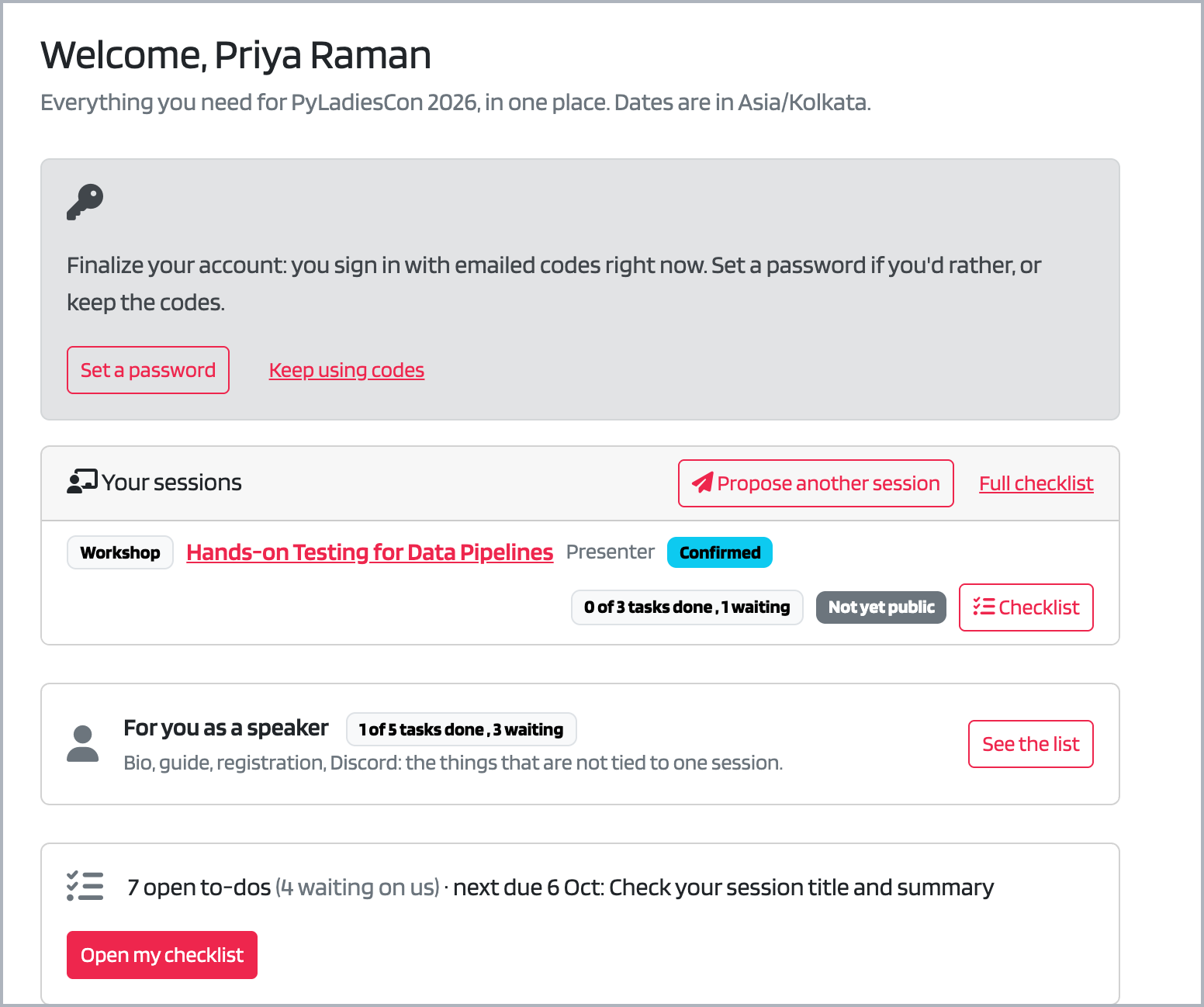
Your dashboard after accepting an invitation, with your session, its status and what is due next. The names are practice data.
From there you get a personal checklist. It shows:
- What we need from you, with due dates in your own timezone: check your session title and summary, add your bio and headshot, read the guide for your session, join Discord, register for the conference, share your slides, and book a tech check.
- What we’re doing to prepare your session: onboarding, the Discord channel and role, promo materials, scheduling, the confirmation of your slot, and the day-of reminder. You can see who on the team has each item and whether it is waiting on you or on us.
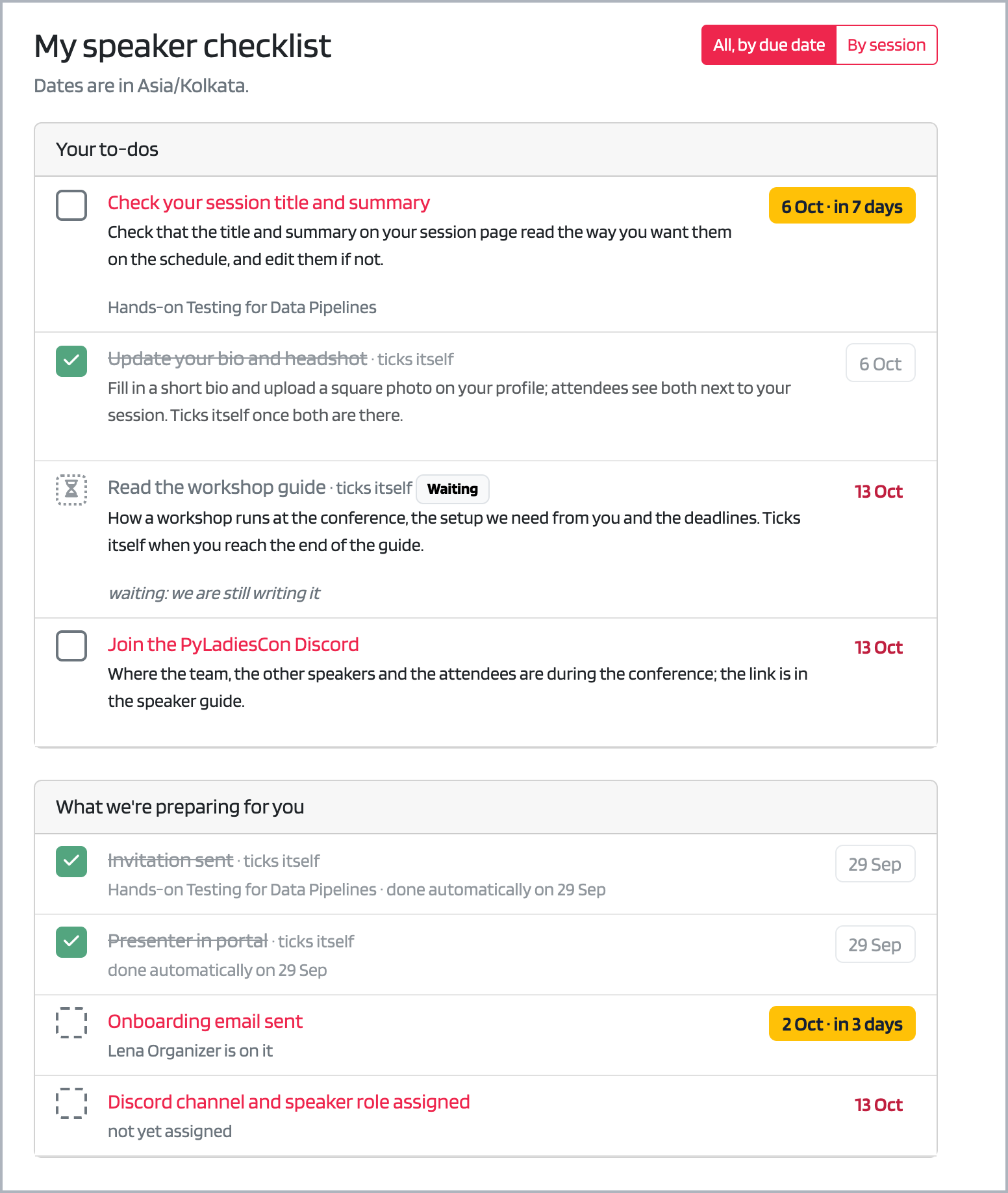
Your checklist: what you need to do, and what the team is doing to prepare your session. Practice data.
You also get reminder emails as due dates get closer, so you do not have to keep the page open.
You enter your details once. Your bio, photo, links and session details live on your profile, and we use them from there, instead of asking you to send them again for the website, the schedule and the social media cards.
Your journey as a presenter is more than the proposal
Sending your session details is the start, not the end. If we had given you a Google Form to fill in, that is where your journey would have ended. That is what a form is for: information intake. It does not remind you what is due, show you what the team is doing, confirm your slot with you, share your promo materials, or tell us when something is stuck.
Between now and the conference there is a program to build, materials to prepare, a schedule to confirm, and people to introduce you. That is a lot of small steps for both of us to keep track of, and it is easy to lose one.
That is why your checklist stays open until the end of the conference. It lets you and the organizers see the same picture of how far along things are, and it lets us spot a problem long before the day.
If you are performing in PyJam, or giving a pre-recorded session, the same goes for your video. Uploading recordings through the portal is something we are still building. When it opens we will email everyone it affects and add the upload to your checklist. We are designing it so that your files go to storage that only you and the team can reach, rather than a shared link that floats around in a thread.
Your information
The portal stores what you give us: your name and email, bio, an optional photo, your timezone and links, and the details of your session. It has no third-party analytics or advertising trackers. Like most sites it does load fonts, icons and one script library from public content delivery networks.
The portal itself is open source, built with Python and Django, and the code is on GitHub. You do not have to take our word for what it does with your information: you can read it, and if you spot something, or want to help improve it, issues and pull requests are welcome.
Getting started
- Want to host a workshop or submit a PyJam performance? Head to the propose page. If you volunteered with PyLadiesCon before, you already have an account and can sign in with it.
- Were you personally invited? Open the email from us and choose the accept button. It signs you in and creates your account, and you do not need a password.
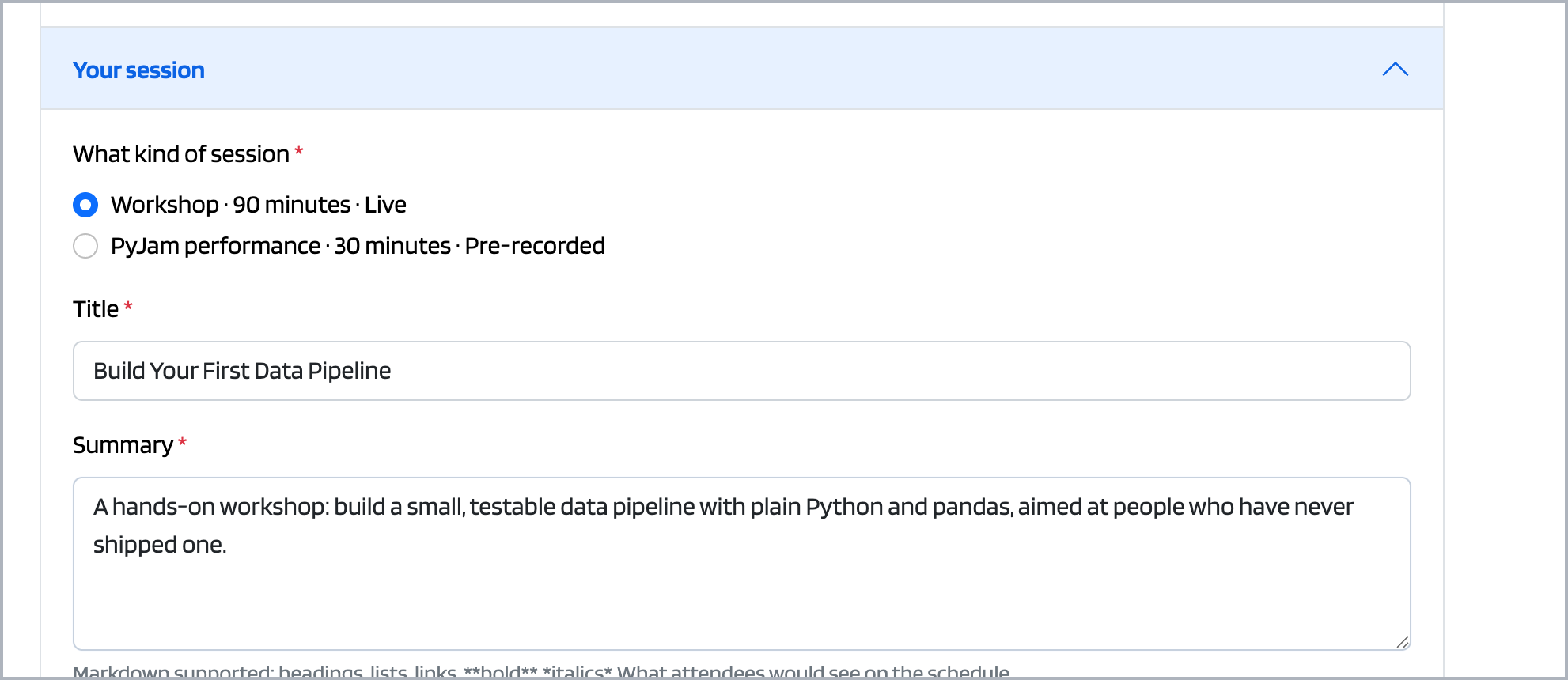
The proposal form. A title and a summary is enough to start. Practice data.
See how it works
Here is the whole thing on screen. Both recordings use practice data, not real people.
Proposing a workshop or a PyJam performance, using an account you already have:
Accepting an invitation and finding your way around:
For the written steps, what every screen means, and what to do if something goes wrong, read the speaker guide in the portal documentation.
If the portal gets in your way, or you cannot use it for any reason, reply to any email from us and tell us. We would rather fix it or find another way than have you stuck.
Thank you for sharing your time and talent with the community. We look forward to seeing you in December.
Stay Connected 🔗
Don’t miss a beat! Follow us for announcements and updates.
- Blog: conference.pyladies.com/blog
- RSS Feed: conference.pyladies.com/rss.xml
- Social Media: Find our social media handles at the footer.
- Official Conference Hashtag: #PyLadiesCon